
Free Images on Shutterstock: Ultimate Guide to Finding and Downloading [2023]

Shutterstock is renowned for its vast collection of high-quality stock photos, but did you know it also offers free images? We understand the challenge of finding cost-effective visuals for your projects, and we’re here to help you navigate Shutterstock’s free offerings.

In this article, we’ll guide you through the process of discovering and downloading free images on Shutterstock. We’ll explore the platform’s free image section, explain licensing terms, and share tips to maximize your search results. Whether you’re a blogger, small business owner, or creative professional on a budget, we’ve got you covered.

Key Takeaways

  • Shutterstock offers free images, including photos, vectors, illustrations, and editorial content, with regular updates to the collection.
  • Navigate Shutterstock’s free image section using effective search techniques and filters to find suitable visuals for your projects.
  • Explore weekly free image collections and the free image of the month to build a diverse library of high-quality visuals at no cost.
  • Leverage Shutterstock’s free trial period to access premium content and compare it with other stock photo alternatives.
  • Follow best practices for attribution and licensing when using free Shutterstock images to avoid potential legal issues.

Understanding Shutterstock’s Free Image Offerings

Shutterstock provides a diverse selection of free images for users to explore and utilize. We’ll delve into the types of free images available and discuss the limitations and usage rights associated with these offerings.

Types of Free Images Available

Shutterstock’s free image collection includes a variety of visual content:

  • Photographs: High-quality images spanning various subjects and themes
  • Vectors: Scalable graphics suitable for diverse design projects
  • Illustrations: Artistic renderings for creative applications
  • Editorial images: Newsworthy photos for current events and trending topics

These free images cater to different needs, from personal blogs to professional presentations. Shutterstock regularly updates its free image selection, ensuring fresh content for users.

Limitations and Usage Rights

When using Shutterstock Free Images, it’s crucial to understand the associated terms:

  • Limited selection: Free images represent a small portion of Shutterstock’s vast library
  • Licensing restrictions: Free images typically come with a standard license, limiting certain commercial uses
  • Attribution requirements: Some free images may require crediting the creator or Shutterstock
  • Time-sensitive availability: Free offerings may change periodically, with images rotating in and out of the collection

While Shutterstock Free Images provide a cost-effective alternative to paid stock photos, users seeking more extensive options might consider exploring other stock photo agencies or investing in affordable plans for greater access to premium content.

Navigating Shutterstock’s Free Image Section

Shutterstock’s free image section offers a wealth of high-quality visuals for various projects. We’ll guide you through the process of finding these free resources efficiently.

Using the Search Bar Effectively

The search bar is our primary tool for locating Shutterstock free images. We enter relevant keywords that describe the type of image we’re seeking. For instance, typing “business meeting” yields results related to corporate settings. To refine our search, we use specific terms like “outdoor business meeting” or “diverse team meeting.” Combining keywords helps us narrow down results and find the most suitable free images for our projects.

Filtering Results for Free Content

After entering our search terms, we use Shutterstock’s filtering options to isolate free content. Here’s how:

  1. Look for the “Free” filter: It’s typically located in the left sidebar or top menu.
  2. Select “Free”: This narrows our results to only display free images.
  3. Apply additional filters: We can further refine by image type (photo, vector, illustration) or orientation (horizontal, vertical, square).
  4. Sort results: Options include “Newest” or “Most Popular” to find recently added or widely used free images.

By effectively using these search and filtering techniques, we maximize our chances of finding suitable free images on Shutterstock. While the selection of free content may be limited compared to paid options, it’s a valuable resource for those seeking cost-effective visual solutions. For more extensive needs, exploring other stock photo agencies or considering Shutterstock’s affordable plans might be worthwhile.

Exploring Shutterstock’s Free Image Collections

Shutterstock offers several collections of free images for users to explore and download. These collections provide valuable resources for those seeking high-quality visuals without the cost associated with premium stock photos.

Weekly Free Images

Shutterstock’s Weekly Free Images collection is a rotating selection of free content updated every seven days. This collection typically includes a variety of image types, such as photos, vectors, and illustrations. To access these free images:

  1. Visit the Shutterstock homepage
  2. Look for the “Free This Week” section
  3. Browse through the available options
  4. Download desired images before the week ends

By checking this collection regularly, users can build a diverse library of free, high-quality visuals for their projects.

Free Image of the Month

Shutterstock also offers a Free Image of the Month, providing users with a single, premium-quality image at no cost. This feature allows users to experience the caliber of Shutterstock’s paid content without a financial commitment. To find and download the Free Image of the Month:

  1. Navigate to the Shutterstock homepage
  2. Locate the “Free Image of the Month” section
  3. Click on the featured image to view details
  4. Download the image using the provided button

While Shutterstock Free Images offer a cost-effective solution for visual content needs, users requiring a more extensive selection may consider exploring other stock photo agencies or affordable plans for greater access to premium content.

Leveraging Shutterstock’s Free Trial

Shutterstock offers a free trial period that provides an excellent opportunity to access premium content without immediate financial commitment. We’ll explore how to make the most of this trial, allowing you to potentially find and download high-quality images for your projects.

Signing Up for a Free Account

Creating a free Shutterstock account is straightforward and opens the door to various benefits. Here’s how to get started:

  1. Visit the Shutterstock website
  2. Click on the “Sign Up” button in the top-right corner
  3. Enter your email address and create a password
  4. Agree to the terms of service and privacy policy
  5. Verify your email address by clicking the link sent to your inbox

With a free account, you’ll gain access to Shutterstock’s free image collections and be eligible for the free trial of their premium services.

Maximizing Your Free Trial Period

To make the most of Shutterstock’s free trial, follow these strategies:

  1. Plan ahead: Determine your image needs before starting the trial
  2. Set reminders: Mark your calendar for the trial’s end date to avoid unexpected charges
  3. Explore extensively: Test various search terms to find the best images for your projects
  4. Download strategically: Save high-resolution versions of images you might use in the future
  5. Compare with alternatives: Use this time to evaluate Shutterstock against other stock photo agencies

Remember, while Shutterstock offers high-quality content, it’s worth exploring other options like Adobe Stock Images or cheaper stock photo alternatives to find the best fit for your long-term needs.

Alternative Methods to Access Free Shutterstock Images

While Shutterstock offers a dedicated free image section, there are additional ways to access complimentary visuals from this platform. We’ll explore two alternative methods that can help you find Shutterstock Free Images without directly navigating to their free image collection.

Shutterstock’s Social Media Channels

Shutterstock’s social media accounts often provide access to free images:

  • Follow Shutterstock on platforms like Instagram, Facebook, and Twitter
  • Look for posts featuring free image downloads
  • Check their social media stories for limited-time offers
  • Participate in social media contests to win free image credits
  • Subscribe to their YouTube channel for video tutorials and free asset announcements

Promotional Offers and Discounts

Shutterstock frequently runs promotions that can lead to free or heavily discounted images:

  • Sign up for Shutterstock’s email newsletter to receive exclusive offers
  • Visit Shutterstock during major holidays for special promotions
  • Look for bundle deals that include free image credits with paid subscriptions
  • Check deal sites like Groupon or RetailMeNot for Shutterstock coupons
  • Compare Shutterstock’s offers with other Stock Photo Agencies to find the best value
  • Consider Shutterstock’s competitor promotions, such as Adobe Stock Images, which may offer free trials or introductory deals

By exploring these alternative methods, you’ll increase your chances of accessing Shutterstock Free Images and potentially discover other Cheap Stock Photos options in the process.

Best Practices for Using Free Shutterstock Images

When utilizing Shutterstock free images, it’s crucial to follow best practices to ensure proper usage and avoid potential legal issues. We’ll explore key considerations for attribution, licensing, and common pitfalls to sidestep when working with these resources.

Proper Attribution and Licensing

Proper attribution is essential when using Shutterstock free images. We recommend:

  • Checking the specific licensing terms for each image
  • Including the photographer’s name and Shutterstock in the credit line
  • Placing the attribution near the image or in a dedicated credits section
  • Linking back to the original Shutterstock page when using images online

It’s important to note that licensing terms may differ between Shutterstock free images and those from other stock photo agencies like Adobe Stock Images. Always review the licensing agreement carefully to ensure compliance.

Avoiding Common Mistakes

To make the most of Shutterstock free images and avoid potential issues, we advise:

  • Not assuming all Shutterstock images are free to use
  • Refraining from modifying images beyond what’s permitted by the license
  • Avoiding use in logos or trademarks without explicit permission
  • Not redistributing or reselling free images
  • Keeping track of image usage and updating licenses as needed

By following these guidelines, users can effectively leverage Shutterstock free images while respecting copyright and licensing requirements. For those requiring a wider selection, exploring other stock photo agencies or considering affordable plans for access to premium content may be beneficial.

Conclusion

Shutterstock’s free image offerings provide a valuable resource for those seeking high-quality visuals without breaking the bank. By utilizing the platform’s dedicated free section, exploring weekly collections, and leveraging alternative methods, we can access a diverse range of images for our projects.

Remember to adhere to licensing terms and attribution requirements when using these free resources. For those needing a more extensive selection, exploring affordable plans or other stock photo agencies might be worthwhile. With these strategies, we can make the most of Shutterstock’s free images while maintaining professional standards in our visual content.

 

How to Choose the Perfect Style for Graphics and Photos: A Complete Guide

Selecting the perfect style for graphics and photos can be a daunting task, especially with the myriad of options available today. Whether you’re working on a personal project or a professional endeavor, the right visual style can make or break your message.

In today’s digital age, visuals play a crucial role in capturing attention and conveying information effectively. From social media posts to marketing materials, the style of your graphics and photos can significantly impact how your audience perceives your brand or message. By understanding key principles and considering your target audience, you’ll be better equipped to choose a style that resonates and achieves your goals.

Understanding the Importance of Image Style

Impact on Brand Identity

Image style shapes brand perception and recognition. Consistent visual elements across graphics and photos reinforce brand identity. Choose a style that aligns with your brand’s values, personality, and target market. For example, a tech company might opt for sleek, minimalist graphics, while a natural cosmetics brand could use earthy, organic imagery.

Emotional Connection with Audience

Graphics and photos evoke emotional responses, influencing audience engagement. Select styles that resonate with your target demographic’s preferences and aspirations. For instance, vibrant, energetic images appeal to younger audiences, while softer, muted tones might connect better with an older demographic. Consider using Shutterstock Free Images to explore various styles and their emotional impact before finalizing your choice.

Factors to Consider When Choosing Image Style

Content Relevance

Select graphics photos that align with your content’s message and theme. Ensure the chosen images reinforce your main points and enhance understanding. Use visuals that directly relate to the subject matter, avoiding generic or irrelevant imagery that may confuse your audience.

Target Audience Preferences

Tailor your image style to your audience’s tastes and expectations. Research demographic data and industry trends to identify visual preferences. Consider factors such as age, cultural background, and professional context when selecting graphics photos that resonate with your target group.

Brand Aesthetics and Color Scheme

Maintain consistency with your brand’s visual identity when choosing image styles. Align graphics photos with your established color palette, typography, and overall design aesthetic. Use Shutterstock Free Images to explore options that complement your brand’s visual elements while maintaining a cohesive look across all marketing materials.

Image Purpose (e.g., Informative, Decorative, Persuasive)

Choose image styles based on their intended function within your content:

  • Informative: Select clear, detailed graphics photos that effectively convey data or explain concepts
  • Decorative: Opt for visually appealing images that enhance the overall aesthetic without distracting from the main content
  • Persuasive: Use emotionally evocative or aspirational images to influence audience opinions or actions

When selecting Images for Commercial Use, ensure they align with your specific purpose to maximize their impact and effectiveness in your project.

Popular Image Styles and Their Applications

High-Key vs. Low-Key Photography

High-key photography uses bright lighting and minimal shadows to create a light and airy atmosphere. This style is ideal for portraying optimism, cleanliness, or simplicity. Use high-key images for beauty products, lifestyle brands, or tech companies aiming for a modern aesthetic.

Low-key photography emphasizes shadows and contrast, creating a moody or dramatic effect. This style works well for luxury brands, artistic projects, or content that requires a sense of mystery or sophistication. Low-key images are effective in fashion, automotive, or high-end product photography.

Natural vs. Stylized Imagery

Natural imagery focuses on capturing subjects in realistic settings with minimal editing. This style is suitable for authentic brand messaging, documentary-style content, or industries emphasizing transparency. Use natural images for environmental causes, food and beverage companies, or travel destinations.

Stylized imagery involves heavy editing or artistic manipulation to create a specific visual effect. This style is appropriate for creative industries, fantasy-themed content, or brands aiming for a unique visual identity. Stylized images work well in graphic design, entertainment, or avant-garde fashion.

Vibrant vs. Muted Color Palettes

Vibrant color palettes use bold, saturated hues to create energetic and eye-catching visuals. This style is effective for grabbing attention, conveying excitement, or appealing to younger audiences. Use vibrant images for entertainment, sports, or children’s products.

Muted color palettes employ subdued tones and desaturated hues to create a calm or sophisticated atmosphere. This style is suitable for conveying elegance, professionalism, or timelessness. Muted images work well for luxury brands, financial services, or health and wellness industries.

When selecting graphics and photos for your projects, consider using resources like Shutterstock Free Images to explore these different styles. These platforms offer a wide range of Images for Commercial Use, allowing you to experiment with various visual approaches before making your final selection.

Technical Considerations for Image Selection

When choosing graphics and photos, technical aspects play a crucial role in ensuring your visuals are effective and professional. Consider these key factors:

Resolution and Clarity

Select high-resolution images to maintain quality across various display sizes. Aim for at least 300 DPI for print materials and 72 DPI for digital use. Evaluate image sharpness and focus, avoiding blurry or pixelated graphics. For web use, balance resolution with file size to optimize loading times without compromising visual appeal.

File Formats and Compatibility

Choose appropriate file formats based on your intended use:

  • JPEG: Best for photographs and complex images with many colors
  • PNG: Ideal for graphics with transparency or fewer colors
  • SVG: Perfect for logos and icons that need to scale without loss of quality
  • TIFF: Suitable for high-quality print materials

Ensure your chosen format is compatible with your publishing platform or printing service to avoid unexpected display issues.

Copyright and Licensing

Respect intellectual property rights when selecting images:

  • Use Shutterstock Free Images or similar reputable sources for royalty-free content
  • Verify licensing terms for Images for Commercial Use to avoid legal complications
  • Always attribute images as required by the license agreement
  • Consider purchasing extended licenses for widespread or long-term use of graphics and photos

Maintain proper documentation of image sources and licenses to protect your project from copyright infringement issues.

Enhancing Images with Design Elements

Text Overlay Techniques

Add text overlays to graphics and photos to convey key messages or provide context. Use contrasting colors and legible fonts to ensure readability. Place text in areas with minimal visual clutter or apply a semi-transparent overlay to create separation. Experiment with typography styles that complement the image’s mood and subject matter.

Using Icons and Graphics

Incorporate icons and graphics to enhance the visual appeal and communicative power of your images. Select icons that align with your brand aesthetic and message. Use vector graphics for scalability and crisp appearance across different sizes. Integrate these elements seamlessly by matching colors and styles with the underlying photo or graphic.

Balancing Negative Space

Utilize negative space effectively to create visual balance and draw attention to key elements. Leave adequate white space around text overlays and graphics to prevent visual clutter. Position subjects off-center to create dynamic compositions that guide the viewer’s eye. Consider the rule of thirds when placing design elements to achieve a harmonious layout.

Best Practices for Consistent Image Styling

Creating a Style Guide

Develop a comprehensive style guide for your graphics and photos. Include specific guidelines for color palettes, image treatments, and compositional elements. Define acceptable image types, such as illustrations, photographs, or vector graphics. Specify preferred aspect ratios and dimensions for various platforms. Incorporate examples of approved styles and those to avoid, ensuring clarity for anyone creating or selecting images for your brand.

Maintaining Visual Coherence Across Platforms

Establish a unified visual language across all platforms. Use consistent filters, overlays, or editing techniques to create a recognizable brand aesthetic. Implement a standardized approach to image cropping and resizing to maintain visual integrity across different display sizes. Create templates for recurring content types, such as social media posts or blog headers, to ensure uniformity. Regularly audit your visual content across platforms to identify and correct any inconsistencies.

Adapting Style for Different Media (Web, Print, Social)

Tailor your image style to suit specific media requirements while preserving brand consistency. For web graphics, optimize images for fast loading times and responsive design. In print materials, focus on high-resolution images with appropriate color profiles for accurate reproduction. For social media, create graphics that are eye-catching and easily digestible on small screens. Consider using Shutterstock Free Images to experiment with different styles across various media before finalizing your approach. When selecting Images for Commercial Use, ensure they align with your adapted style guide for each medium while maintaining overall brand cohesion.

Common Pitfalls to Avoid

When selecting and implementing graphics and photos, be aware of these common mistakes that can undermine your visual strategy.

Overprocessing Images

Overprocessing images diminishes their impact and authenticity. Excessive filters, unrealistic color adjustments, or heavy-handed retouching create artificial-looking graphics and photos that fail to resonate with viewers. Maintain a balance between enhancement and preservation of natural elements. Use subtle adjustments to improve image quality without compromising the original integrity of the visual.

Inconsistent Styling

Inconsistent styling across your graphics and photos disrupts visual coherence and weakens brand recognition. Varying color schemes, conflicting themes, or mismatched editing styles create a disjointed appearance that confuses your audience. Establish a consistent style guide for your graphics and photos, including color palettes, filters, and compositional elements. Apply these guidelines uniformly across all visual content to reinforce your brand identity.

Ignoring Mobile Optimization

Failing to optimize graphics and photos for mobile devices results in poor user experience and decreased engagement. Large file sizes, improper scaling, or complex designs that don’t translate well to smaller screens frustrate mobile users. Compress images without sacrificing quality, use responsive design techniques, and test your graphics and photos across various devices. Ensure that text overlays remain legible and that crucial visual elements are visible on mobile screens.

Conclusion: Refining Your Image Style Over Time

Choosing the right style for graphics and photos is an ongoing process that evolves with your brand and audience. As you implement these strategies, you’ll develop a keen eye for what works best in your specific context. Remember to stay flexible and open to feedback, adjusting your approach as needed.

Regularly review your visual content to ensure it continues to align with your goals and resonate with your audience. By consistently applying the principles discussed and staying attuned to design trends, you’ll create a powerful visual identity that enhances your message and engages your viewers effectively.


How to Download Shutterstock Free Images

Shutterstock

shutterstock-logo

Shutterstock (click here for review) was founded in 2003 by Jon Oringer. He created the first subscription-based stock photo marketplace has gone on to create one of the world’s largest stock libraries. At the moment, Shutterstock has several different content libraries including music, editorial images and stock video footage.

Shutterstock’s portfolio is impressive. They include Bigstock, PremiumBeats, RexFeatures, SkillFeed and WebDAM. Each one offers a separate library comprising of different types of curated content in addition to their high-end stock image collection. Look these up!

Shutterstock Free Images

free stock photos

In addition to the content contained in Shutterstock’s several libraries, they also offer free images. To download their free images, the first thing you need to do is create an account. Once completed, navigate to their home page and scroll down to where you find the two free image files being offered. One is called the “Free Photo of the Week,” while the other is called “The Free Vector of the Week.”

Although these files are free, they still require you to have an account. These photos may be stock, but they are still professional photos. The same thing goes for the vector image of the week. The images they offer are professionally designed by graphic artists. They only give away these files to give you a taste of what it’s like to be a paid member. It’s like a sampling. This is Shutterstock’s way of showcasing the fact that their images are of the highest quality.

Should You Rely on Free Images?

As a marker, time is usually of the essence. In other words, you don’t always have the leisure of waiting week after week for the right free image to be offered. As one of Shutterstock subscribers, I would certainly go out of my way to add the free images to my personal image library. This increases the number of images I have to choose from the next time I go searching my library for an image I might need.

There is always the danger of using one of their free images. You see, when they offer an image for free, everyone is all over it. That image gets added to the library of several people. That means that I am not the only one with the image and that I will not stand out from the crowd.

That’s the other goal of being a marketer. Don’t you want to stand out from the crowd? Getting your hands on free images is awesome. However, these images are not a way to stand out from the crowd.

Shutterstock Coupon Code: Providing Creative Professionals Their Image Needs

shutterstock-logoShutterstock is global stock photo agency that provides creative professionals their image needs. With over 60 million images, illustrations, vectors and music clips, everyone will surely find a creative file that complements their core message. Yes, when we say everyone, we mean including you. You may need images for your blog, your website or magazine article. Whatever it is, you will find the right image at the website’s very broad library.

The subscription plans offered by the website are reasonable. You will surely find one that suits your budget. What is even better is that Shutterstock offers Shutterstock coupons to help you further your savings. Now, you can set aside more money for more important operational costs through a Shutterstock coupon code. The only question now is where you can get these amazing Shutterstock coupons.

  • Shutterstock. The first place you can get Shutterstock coupon is from the website itself. Yes, that is right. Shutterstock offers coupon codes that give you as much as ten percent savings. The website is aware that many websites like StockPhotoSecrets.com claim to offer these coupons so they would rather give you the discounts themselves. Use these Shutterstock coupons to download the images you need for your creative projects.
  • Affiliated Websites. Shutterstock has an affiliate program that allows other websites to offer Shutterstock coupon codes. One of the trusted websites that offer these codes is stockphotosecrets.com. These website also offer seven to ten percent discounts, which are helpful in the long run. Imagine how much you can save if you are using images on a daily basis.

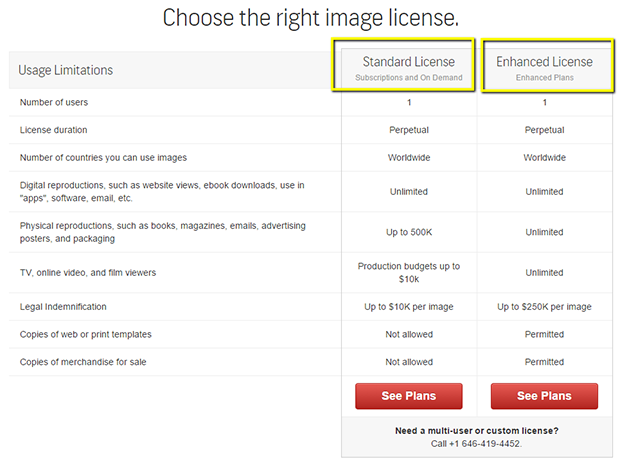
Are you excited to use a Shutterstock coupon for your next subscription plan? You should be. With the discounts you can get from these coupons, you are setting aside a greater budget for other important expenses. Get your coupon codes from Shutterstock or from a reliable affiliated website now and enjoy royalty-free images from basic, professional and team plans – standard licenses.

choose_license_in_shutterstock

  • Basic License. A standard license that allows you to download up to 25 images within one year of purchase.
  • Professional License. A standard license that gives you access to the website’s entire collection with no download limits. You can get a monthly or yearly subscription based on your creative needs.
  • Team Plans. A standard license suitable for small teams or businesses. Of course, the prices will vary according to the number of users. You can download up to 750 images per month for up to one year.

Shutterstock coupon codes are the best way to fulfill your creative needs. You will not only have access to over 60 million royalty-free images, illustrations, vectors and music clips, you will also expand your budget for other important expenses. What are you waiting for? Get your coupons from your trusted website now!